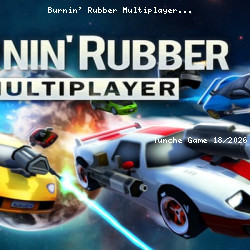
Burnin' Rubber Multiplayer Fast Game
XformGames • 159K Plays • 953.3K Views • star 4.4 (5.7K)
All
Device
Landscape
Orientation
5.7K ratings
Rate This Game
gamepad How to Play Burnin' Rubber Multiplayer
Controls
Keyboard and Mouse
- (W)(A)(S)(D) / (Arrowkeys) : Drive
- (Space) : Nitro
- (Shift) : Drift
- Double-Tap (Shift): U-Turn
- (Z) / (LMB) : Fire Primary
- (X) / (RMB) : Fire Secondary
- (F) / (MMB) : Use Special Weapon
- (C) : Look Behind
- (1) - (0): Dialog Hotkeys
- Hold (`) : Show Dialog Wheel
- (V) : HUD Toggle
- (ESC) / (P) : Pause
Gamepad
- (Left stick) : Steer
- (Right trigger) : Accelerate
- (Left trigger) : Decelerate
- (A) : Nitro
- (B) : Drift
- Double-Tap (B) : U-Turn
- (Right shoulder) : Fire Primary
- (Left shoulder) : Fire Secondary
- (Y) : Use Special Weapon
- (Right stick down) : Look Behind
- Hold (D-Pad Up) : Show Dialog Wheel
- (D-Pad Down) : HUD Toggle
- (Start) : Pause
info About Burnin' Rubber Multiplayer
Burnin' Rubber Multiplayer offers a convenient online gaming experience on TuncheGame. Burnin' Rubber Multiplayer can be played directly on TuncheGame using your web browser.
Burnin' Rubber Multiplayer stands out in the space with unique features. Burnin' Rubber Multiplayer is a game by XformGames that uses unity.
The gameplay reflects the core appeal of the Driving online play now genre strongly. Join Burnin' Rubber Multiplayer and start playing now. Explore more of the gaming world with Feudal Wars or Fashion Challenge: Catwalk Run.